One system per screen
Full screen, with each system's own image or a title screen with its name. Turn the encoder to browse, push it to start.
Boot menu for the Akai MPC Sample
Keep the stock firmware, SampQOL, Melodee, MPC Simple and any other custom OS on one SD card. At power-on, turn the encoder, push, and the system you picked starts.
Every custom OS for the MPC Sample starts from the autorun folder on the SD card. Only one fits, so trying another system meant swapping cards or moving folders around on a computer. Your projects and samples ended up spread over several cards.
SampleBoot puts every system in autorun/mods/ on the same card and shows a menu at power-on. The stock firmware is always one of the choices, and nothing on the MPC itself is changed.
Full screen, with each system's own image or a title screen with its name. Turn the encoder to browse, push it to start.
The last system you used starts after 10 seconds, 20 once you have browsed. Beeps in the last five seconds follow the Main Volume knob.
Always the first entry, with its version on screen. If a system does not start within a minute, SampleBoot starts the stock app instead.
Keep the new beta and the release before it. Each folder is an entry, so going back takes one turn of the encoder.
If the MPC missed the card at power-on, take it out and put it back in: the menu comes up.
Pad and button lights left on by the previous app are switched off. POWER in the menu asks before switching the MPC off.
Drawn as on an old screen. Dark, light, your own 320×240 image, or off. Turn the encoder to skip it.
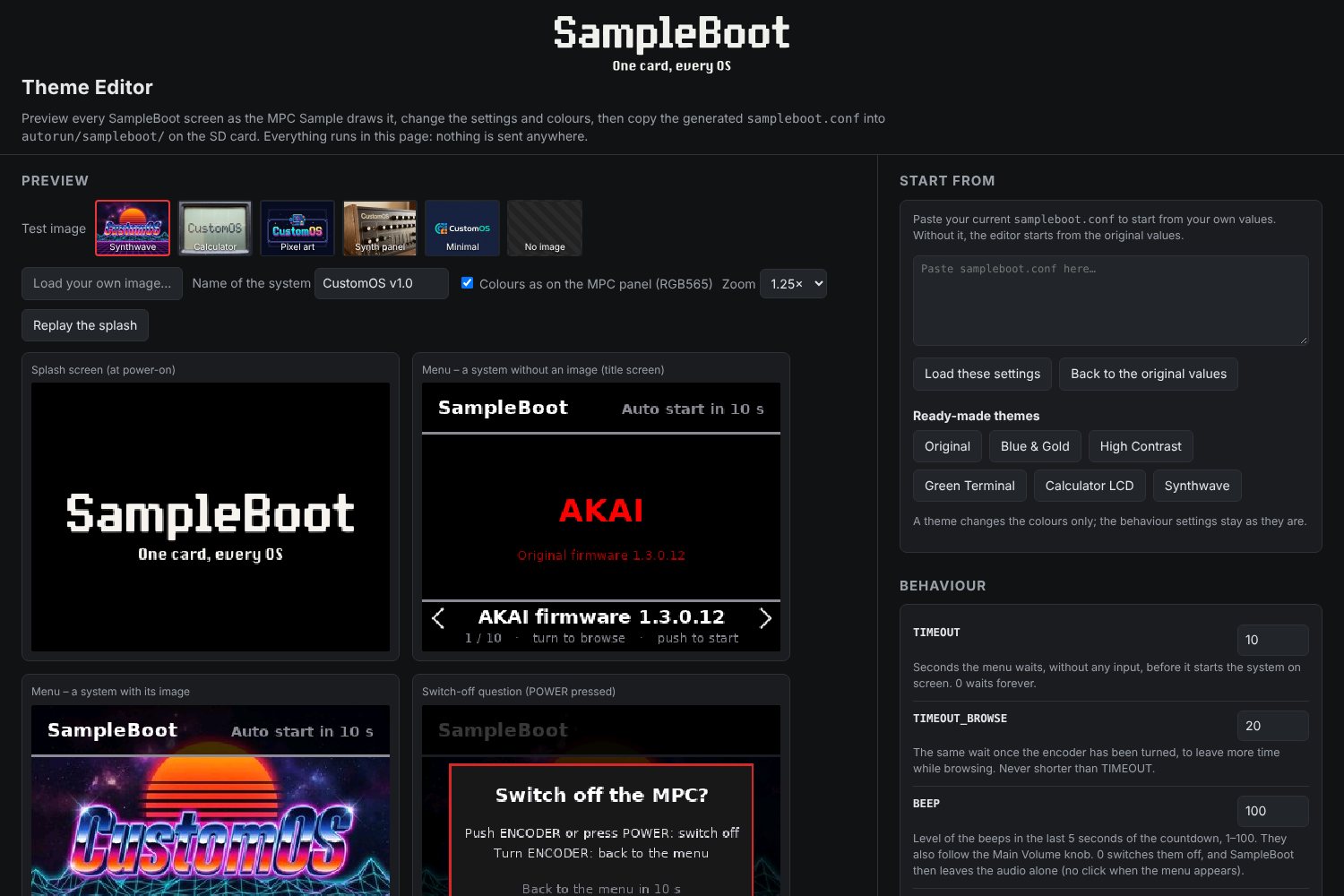
Bars, text, popups: all in one settings file, with an offline theme editor that previews the screens pixel for pixel.
SampleBoot runs each system's own autorun folder, unchanged. Any OS that starts from autorun should work; these are the ones tested so far. SampleBoot includes none of them: download each one from its author.
| System | Versions tested | From |
|---|---|---|
| ■ Stock firmware | 1.3.0 (1.3.0.12) | Akai Professional |
| ■ SampQOL OS | 0.1.4.7 – 0.3.0 | beatops.io/sampqol |
| ■ Melodee | 0.1.0 – 0.3.0 | github.com/keremimo/melodee-sample |
| ■ MPC Simple | 1.0 Beta 1 – Beta 2 | mpcsimple.com |
SampleBoot-1.0.1.zip and unzip it.autorun folder to the top of the card.Already have an autorun folder from an OS? Move it aside first: it becomes a system in the next step.autorun folder into autorun/mods/ and rename it as you want it in the menu.If an OS also has a folder for the top of the card, like MPC Simple's MPC-Simple, copy that too.autorun/ autorun.sh # launcher, do not edit autorun.json autorun.check sampleboot/ # SampleBoot and its settings mods/ SampQOL 0.3.0/ # an OS's autorun folder Melodee 0.3.0/ MPC Simple 1.0 Beta 2/
Copy, replace or delete its folder in autorun/mods/. A folder whose name starts with _ is hidden from the menu.
The menu shows the folder name, or the first line of sampleboot.txt. Add sampleboot.png (320×240) for a picture; SampQOL's own splash is picked up by itself.
add_mod.py in the release installs or updates SampleBoot and adds systems straight from their zips. Optional, Python 3.
Rename or delete the autorun folder, or start without the card.
Every colour of the menu lives in sampleboot.conf. The theme editor shows each screen exactly as the MPC draws it, in the colours the screen can really show, and writes the file for you.
It runs in your browser, works offline and ships with SampleBoot. Presets, colour pickers, the splash screen and your own test images included.
No. It runs from the SD card, like the custom OSes do, and writes nothing to the MPC. Start without the card, or rename its autorun folder, and the MPC starts as stock.
Where they are now. Only the systems go into autorun/mods/. Most mods use the same sample and project folders as the stock app, so you work with the same packs whichever system you start; a few keep their own files.
Take the card out and put it back in: the MPC runs its autorun again and the menu comes up. Save your work in the stock app first, because it gets closed. The menu appears once per power-on, so it never pops up in the middle of a session.
Replace its folder in autorun/mods/, or add the new version next to the old one. Melodee's built-in updater doesn't work while SampleBoot is installed: update Melodee by replacing its folder.
No. SampleBoot only picks which system starts. Each OS saves projects in its own, undocumented way; converting them would need the OS authors on board.
mpc-boot-thingy is a full platform: an app installer over USB or the web, an app grid, games and tools. SampleBoot is the minimal take: one small program, nothing running in the background, each OS's folder copied as it is. Pick the one that suits you.
That's the audio for the countdown beeps opening, louder with the volume up. Set BEEP=0 in sampleboot.conf to remove it.
The card keeps a log of the last boot in autorun/sampleboot/last-boot.log. Open an issue on GitHub with the log attached.
SampleBoot is free. If it saves you some card swapping, you can buy me a coffee.
Buy me a coffee on Ko-fiBug reports and ideas are welcome on GitHub. For anything else, write to: